


CrispSweep Cleaner
4.45.00 Reviews
App Specs
- Version
- 3.0.1
- Updated On
- License
- Free
- Downloads
- 10,000+
- Developer
- Vouch Vault
- Categories
- Productivity
- Platform
- Android
Screenshots
 Analysis by AppCompare
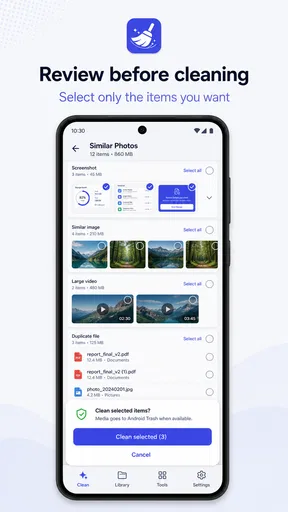
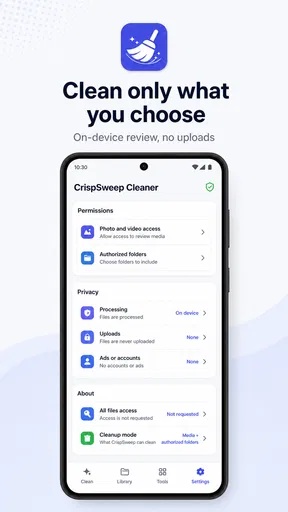
When a phone starts filling up, the hardest part is rarely finding files. The real problem is deciding what can safely go. CrispSweep Cleaner takes a focused approach to that job: it scans media and folders I choose, then lets me review items before cleaning them. That review-first workflow is the part that matters most in everyday use, because it keeps the final decision in my hands instead of treating every large or old file as disposable.
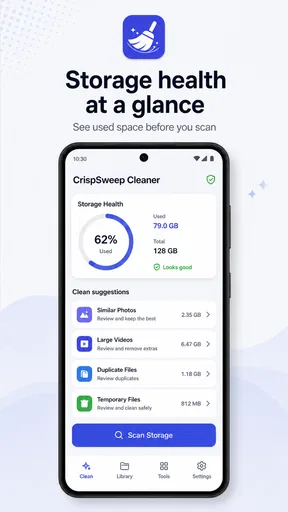
I tested CrispSweep Cleaner as a productivity app from Vouch Vault, and I found its appeal easy to understand. It is free, rated for Everyone, and aimed at people who want a more deliberate way to tidy a phone. Its current version is 3.0.1, and it runs on Android 8.0 or later. The app has reached over ten thousand installs and holds a 4.4 average from around thirty ratings, which suggests a small but generally positive user base rather than a long-established cleaning giant.
Why the review-before-clean approach matters
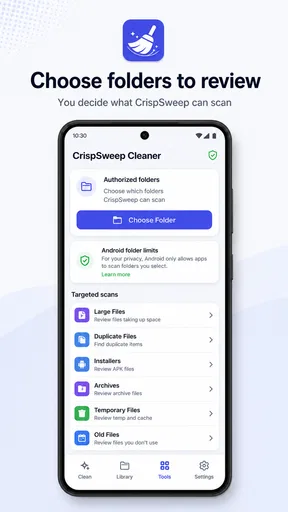
The central capability is selective cleanup. Instead of presenting cleaning as one large button press, CrispSweep Cleaner works around two choices: which media to inspect and which folders to include. That distinction is important. A phone’s storage is not just a pile of junk; it contains screenshots worth keeping, downloaded documents needed for work, family videos, cached-looking images, and folders created by apps that may still be useful.
In my view, the strongest idea here is the separation between finding and deleting. The scan helps surface material that deserves attention, but the cleanup only happens after I review selected items. The safest cleaner is the one that makes me pause before deleting. That extra pause may sound less convenient than automatic removal, yet it is exactly what reduces the risk of losing something irreplaceable.
This makes the app different from the usual storage tools built into a phone. System storage screens are useful for seeing broad categories and large applications, but they can feel too general when I want to inspect particular folders. On the other hand, aggressive cleaner apps often prioritize speed and volume, encouraging a quick sweep through suggested files. CrispSweep Cleaner sits between those approaches: it is more targeted than a basic storage summary and more cautious than an automatic purge.
Choosing the scan rather than scanning everything
The folder-selection part is more valuable than it first appears. If I am trying to clear a cluttered downloads location, I do not necessarily want a full inspection of personal photos or messaging media at the same time. Narrowing the scan gives the cleanup a clear purpose and helps prevent the common mistake of mixing unrelated decisions together.
I would use one scan for screenshots, another for a downloads folder, and a separate pass for media that has accumulated through everyday sharing. This is a practical workflow because each group has a different deletion rule. Screenshots can often be judged quickly, while documents may need a filename check and personal videos deserve more care. Treating these areas separately makes the review less tiring.
Worth Reading Before You Choose

EA SPORTS FC Mobile 26 Is a Bigger Football Game, but It Takes Time

Flipboard Shows What News Apps Must Do Beyond the Feed

Switching to Android Auto Means Rethinking Your Driving Routine

Google Calendar Makes a Crowded Week Easier to Manage

Ludo King Makes the Most of the Minutes Between Plans

Baby Panda World Brings Quick Play to Modern Phones, but Its Game Library Feels Busy
There is also a useful psychological benefit. A phone that feels chaotic can make cleanup seem like a major project. Selecting one folder turns it into a smaller task with a visible boundary. I am not trying to solve all storage problems in one session; I am reviewing one known area and stopping when that area is under control.
What the process feels like in ordinary use
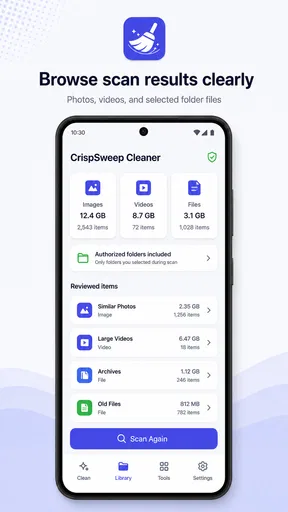
The practical flow is straightforward in concept. I choose media or folders to examine, let the app identify the contents, look through the results, and select only the items I am comfortable removing. That sequence is simple enough for a quick maintenance session, but it still asks me to pay attention. CrispSweep Cleaner is not designed around blind automation, and that is both its strength and its main source of friction.
For example, imagine returning from a trip with a phone full of repeated screenshots, temporary downloads, and several short videos shared in a group chat. I would begin with the folder most likely to contain temporary material rather than selecting every location at once. After scanning, I would review filenames and previews where available, keep anything connected to the trip, and remove only the obvious leftovers. Then I could repeat the process for screenshots without accidentally carrying the same decision into personal media.
This workflow is especially helpful when storage pressure is immediate but the files are mixed together. Instead of opening a general file manager and manually browsing through unfamiliar paths, I get a cleaning task organized around selected media and folders. The app does not remove the need for judgment, but it reduces the amount of searching required before that judgment.
Three habits that make the cleaner more useful
My first recommendation is to scan with a question in mind. “What can I delete?” is too broad. “Which old screenshots no longer serve a purpose?” or “Which downloaded files can I verify and remove?” produces a more manageable review. The narrower question helps me avoid treating personal media and temporary material as if they had the same value.
Second, I would review in batches based on origin, not just size. A large video may be worth keeping, while dozens of small screenshots may create more visual clutter and be easier to remove confidently. If I focus only on the largest items, I may free space but leave the phone difficult to navigate. CrispSweep Cleaner’s ability to work with chosen media and folders supports this more thoughtful order.
Third, I would avoid using a cleanup session as a substitute for organization. Removing unwanted files is not the same as arranging important ones. Before selecting an item, I ask whether it is genuinely disposable or merely in the wrong place. This is a subtle but important trade-off: the app helps with selection and cleaning, but I still need another habit for preserving files that matter.
The best situation for CrispSweep Cleaner
The app makes the most sense for someone whose storage problem is caused by accumulation rather than a single enormous application. If screenshots, shared media, and downloaded files have gradually spread through several locations, a targeted review can be more useful than a broad storage chart. I can work through one area at a time and make decisions with the surrounding context still visible.
I also see a good fit for people who are cautious about automated cleaners. Some users want assistance finding candidates but do not want an app deciding what is safe. CrispSweep Cleaner respects that preference by putting selection at the center of the process. It is not trying to replace my judgment; it is helping me direct it toward the places most likely to contain removable material.
A realistic example would be a student who uses the phone for classes, commuting, and social messaging. Screenshots of timetables and lecture slides may be useful for a while, but old versions can become confusing. Downloads may include documents that were opened once and forgotten. A weekly review of one chosen folder could clear obvious clutter while preserving current coursework. The important point is not to run a sweeping cleanup without thought, but to use the app as a controlled checkpoint.
Another strong use case is preparing for a specific event. Before recording a long video or traveling without reliable connectivity, I might review media folders and downloads to create breathing room. Because I can choose what to inspect, the preparation can stay focused. I do not need to turn it into a complete phone-maintenance ritual every time.
Where a different tool may be better
If I only want a quick overview of what consumes storage, the phone’s built-in settings may be faster. Those tools usually show application sizes and broad categories without asking me to conduct a detailed media review. They are the better first stop when an unexpectedly large app or system area is the likely cause.
A full file manager may also be preferable when the goal is moving, renaming, or arranging files rather than cleaning selected items. CrispSweep Cleaner is focused on reviewing and removing candidates. Someone who wants a complete filing system may find a dedicated manager more flexible, especially when folders need to be reorganized instead of reduced.
Likewise, users who expect one-tap automation may find this app too deliberate. The review step is not a minor detail that can be skipped without changing the experience; it is the point of the workflow. That is excellent for cautious cleanup, but less attractive when the user already knows exactly what should disappear and wants the fastest possible action.
The trade-off between control and speed
Every selective cleaner asks for some attention, and CrispSweep Cleaner is no exception. The more carefully I inspect results, the less likely I am to delete something important, but the longer the session takes. This is a fair trade-off rather than a flaw, although it means the app works best when I use it for short, purposeful passes instead of expecting instant transformation.
The same caution can feel repetitive if the phone contains many similar files. Reviewing a large collection one item at a time may be tiring, particularly when several files look equally disposable. In that situation, I would narrow the folder first and use a clear rule, such as removing only outdated screenshots or confirmed temporary downloads. Without a rule, the app can expose clutter without making the decision process easier.
There is also a risk of overconfidence after a successful cleanup. Freeing space in one selected folder does not mean the whole phone is organized. I would treat each scan as a local improvement and check the result before moving on. That mindset keeps the app useful without expecting it to solve every storage issue in a single pass.
What new users should know before starting
The first question many people will have is whether the app deletes files immediately. Its review-centered design means selection comes before cleaning, so I would not approach it like an automatic wipe tool. I would still read the items carefully, especially in folders containing personal photos, work documents, or family media.
Another practical question is whether it can inspect the entire phone at once. The useful way to think about it is not “scan everything or nothing,” but “which media or chosen folder needs attention now?” That approach matches the app’s core strength and makes the results easier to interpret. If I am dealing with one troublesome location, a focused pass is preferable to creating a huge mixed list.
People may also wonder whether it is suitable for older devices. The minimum requirement is Android 8.0, so it covers phones running that version or newer. That does not guarantee identical performance on every handset, but it does make the app relevant to users who are not carrying a recent flagship and still want a focused storage-cleanup workflow.
Because the app is free and rated for Everyone, the barrier to trying it is low. I would still recommend starting with a low-risk folder rather than personal media. A downloads location filled with obsolete files is a better first test than a camera folder containing memories that cannot be replaced.
Who gains the most from this focused cleanup
CrispSweep Cleaner is most valuable to people who want help identifying clutter but insist on making the final call themselves. That includes cautious users, people with crowded media folders, and anyone who feels that the built-in storage screen is too broad for the cleanup they have in mind. Its value is not in promising a magical empty phone; it is in making a specific review easier to start and safer to finish.
I would recommend it less enthusiastically to someone who wants automatic optimization, deep device diagnostics, or a complete file-management suite. Those needs point toward system tools or a broader utility. I would also skip it when the real problem is a large application, because a media-and-folder review is unlikely to address that efficiently.
Vouch Vault’s app has a clear identity despite its modest scale: select an area, inspect what is there, and clean only what earns that decision. The 4.4 average and over ten thousand installs make it look encouraging, while the free price makes experimentation easy. Still, the best results depend on using its deliberate workflow rather than expecting a one-tap rescue.
After using it, my recommendation is simple. Choose CrispSweep Cleaner when you want a careful assistant for media and folder cleanup, particularly when deleting the wrong file would be more frustrating than spending a few extra minutes reviewing candidates. Start with one low-risk location, apply a specific rule, and stop once that task is complete. For controlled, human-reviewed cleanup, it is a sensible productivity tool; for instant automation or full file management, another option will likely suit you better.
Pros
- Quickly identifies large
- duplicate
- and unnecessary files.
- Simple interface makes storage cleanup easy for most users.
- Useful previews help avoid deleting important photos or videos.
- Can free space without requiring advanced technical knowledge.
- Helpful for users managing crowded photo and download folders.
Cons
- Cleanup suggestions may require careful checking before deletion.
- Results can vary depending on device storage and Android permissions.
- Some useful features may be restricted to a paid version.
- Scanning large media libraries can take noticeable time.
- Cleaner apps may offer limited benefits on devices with ample storage.
FAQs for CrispSweep Cleaner
What is CrispSweep Cleaner, and what does it do?
CrispSweep Cleaner is a mobile utility designed to help organize and clean up storage on a smartphone. Its features may include identifying unnecessary files, duplicate photos, large videos, cached data, and other items that can occupy valuable space. Before deleting anything, review the suggested files carefully, because the app’s recommendations may include items you still want to keep.
Is CrispSweep Cleaner safe to use on Android or iPhone?
CrispSweep Cleaner can be useful when downloaded from a legitimate official store and granted only the permissions it genuinely needs. However, users should still review its privacy policy, developer information, subscription terms, and requested access before continuing. A cleaning app may require access to photos, files, or storage, so avoid granting permissions that seem unrelated to its advertised features.
Can CrispSweep Cleaner delete important photos, videos, or documents?
Like most storage-cleaning tools, CrispSweep Cleaner may identify files it considers unnecessary, including duplicates, blurry images, old downloads, or large media. Automated suggestions are not always perfect, so check the preview and selected items before confirming a cleanup. Backing up important photos and documents to cloud storage or another device is recommended before using any delete function.
Does CrispSweep Cleaner offer free cleaning, or does it require a subscription?
The available tools and pricing can depend on the version of CrispSweep Cleaner, your operating system, and your region. Some functions may be free, while advanced cleaning options, unlimited scans, or extra utilities may require an in-app purchase or recurring subscription. Read the payment screen carefully, especially the renewal terms, trial duration, and cancellation instructions, before accepting an offer.
Will CrispSweep Cleaner significantly improve my phone’s performance or battery life?
CrispSweep Cleaner may free storage space and make it easier to manage clutter, particularly when your device is nearly full. However, deleting temporary files does not guarantee a major improvement in speed or battery life. Performance problems can also result from outdated software, demanding apps, weak battery health, or limited memory. Treat the app as a storage-management tool rather than a complete device optimizer.


